KickHost
  • 0 Shopping Cart
  • Home
  • Store
    • Browse All
    • Standard Hosting
    • Advanced Hosting
    • WordPress Hosting
    • Joomla Hosting
    • WooCommerce Hosting
    • PrestaShop Hosting
    • Magento Hosting
    • School Hosting
    • Core VPS
    • Student Hosting
    • Max Performance VPS
    • Reseller Hosting
    • Business Email Hosting
    • Microsoft 365
    • Google Workspace
    • SSL Certificates
    • Performance VPS
    • Dedicated Servers
    • DNS Management
    • CloudFlare DNS
    • Website Backup
    • Website Security
    • E-mail Services
    • Register a New Domain
    • Transfer Domains to Us
  • Announcements
  • Knowledgebase
  • Network Status
  • Affiliates
  • Contact Us
  • More
  • Account
    • Login
    • Register
    • Forgot Password?
  1. Portal Home
  2. Knowledgebase
  3. cPanel - Control Panel
  4. How to Create a Cronjob in cPanel

  Categories

Backup/Restore
4
CloudLinux (cPanel)
10
cPanel - Control Panel
24
Databases
11
DirectAdmin
48
DNS - Nameservers
6
Domain Management
10
Email
17
FTP
9
Installing a Control Panel
6
Mail Filters & SPAM
8
Mobile
11
Others
3
PayPal
7
Plesk
47
Security
10
SiteWorx/InterWorx
58
Softaculous
69
SolusVM
18
SSL
5
Virtualizor
19
WHM
18
WordPress
17

  Categories

  Support

My Support Tickets
Announcements
Knowledgebase
Downloads
Network Status
Open Ticket

How to Create a Cronjob in cPanel Print

  • 0

1. Log in to your cPanel account.


2. In the Advanced section, click on Cron Jobs.


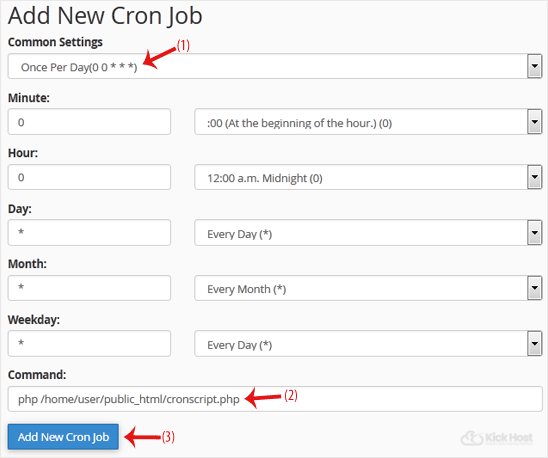
3. Under Add New Cron Job, click on the Common Settings drop-down menu and select an appropriate option such as Once Per Day or another suitable option.

4. Enter your cronjob PHP file location or the command you want to run in the Command field.

5. Click on Add New Cron Job.

Was this answer helpful?

Related Articles

How to Reset cPanel's Account Password If you have access to your cPanel account, follow these steps to reset your password:1. Log in to... How to Change cPanel's Style/Theme Switching over to another cPanel theme with a different style is easy.1. Log in to your cPanel... How to Update a Cronjob Email Address in cPanel You can enable cronjob notifications or update a cronjob's email address in cPanel. 1. Log in to... How to Reset the PHP Version to the Default Version in cPanel If you want to reset the PHP version to the default version, follow these instructions:1. Log in... How to Change the PHP Version on Your Domain in cPanel Some software requires a different version of PHP. You can switch the PHP versions using cPanel....
« Back

  Support

My Support Tickets
Announcements
Knowledgebase
Downloads
Network Status
Open Ticket
  • Contact Us
  • Terms of Service

Copyright © 2026 KickHost. All Rights Reserved.


Loading...
Loading...
Choose language
العربية
Azerbaijani
Català
中文
Hrvatski
Čeština
Dansk
Nederlands
English
Estonian
Persian
Français
Deutsch
עברית
Magyar
Italiano
Macedonian
Norwegian
Português
Português
Română
Русский
Español
Svenska
Türkçe
Українська

Choose Currency

$ USD
KSh KES
GBP GBP
EUR EUR
USh UGX
RWF RWF
TSh TZS
NGN NGN
GHS GHS
CA$ CAD
INR INR
R ZAR
JPY JPY
R$ BRL
CDF CDF
CLP CLP
CNY CNY
COP COP
ETB ETB
Rp IDR
MWK MWK
MX$ MXN
S$ SGD
SSP SSP
TRY TRY
ZMW ZMW

Generate Password

Enter a number between 12 and 64 for the password length.