If you want to delete an FTP account, you can accomplish it by following this tutorial.
1. Log in to your cPanel account.
2. In the Files section, click on FTP Accounts.

3. Under the FTP Accounts list, choose Delete.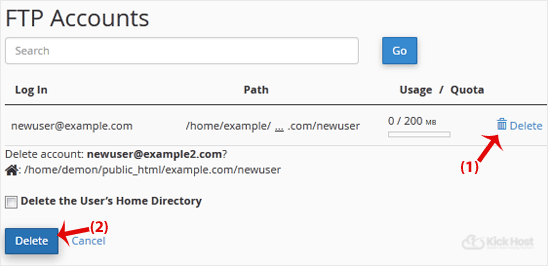
4. Click on Delete once again to confirm and remove the FTP account.
Warning: Do not use the Delete the Users Home Directory option. Otherwise, the data inside your FTP user account will also be deleted and will become unrecoverable unless you restore it with a backup.
- Home
-
Store
- Browse All
- Standard Hosting
- Advanced Hosting
- WordPress Hosting
- Joomla Hosting
- WooCommerce Hosting
- PrestaShop Hosting
- Magento Hosting
- School Hosting
- Core VPS
- Student Hosting
- Max Performance VPS
- Reseller Hosting
- Business Email Hosting
- Microsoft 365
- Google Workspace
- SSL Certificates
- Performance VPS
- Dedicated Servers
- DNS Management
- CloudFlare DNS
- Website Backup
- Website Security
- E-mail Services
- Register a New Domain
- Transfer Domains to Us
- Announcements
- Knowledgebase
- Network Status
- Affiliates
- Contact Us
-
More