1. Log in to your cPanel account.
2. In the Email section, click on Email Filters.
3. Under Filters by Users, you can see all your existing email accounts. Click on Manage Filters next to the appropriate one.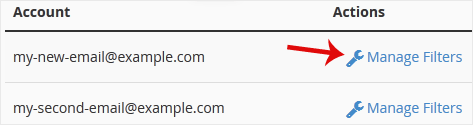
4. Under Current Filters, click on Edit next to the appropriate filter.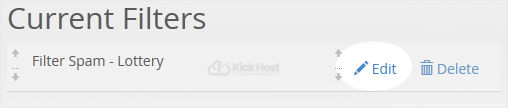
5. Make the desired changes to the filter.
6. Click on Save.
- Home
-
Store
- Browse All
- Standard Hosting
- Advanced Hosting
- WordPress Hosting
- Joomla Hosting
- WooCommerce Hosting
- PrestaShop Hosting
- Magento Hosting
- School Hosting
- Core VPS
- Student Hosting
- Max Performance VPS
- Reseller Hosting
- Business Email Hosting
- Microsoft 365
- Google Workspace
- SSL Certificates
- Performance VPS
- Dedicated Servers
- DNS Management
- CloudFlare DNS
- Website Backup
- Website Security
- E-mail Services
- Register a New Domain
- Transfer Domains to Us
- Announcements
- Knowledgebase
- Network Status
- Affiliates
- Contact Us
-
More