WordPress plugins are very useful. You can easily install a plugin from the WordPress dashboard.
1. Log in to the WordPress dashboard.
2. From the Dashboard menu, go to Plugins and click on Add New.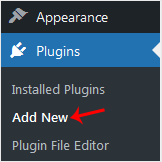
3. Use the Search filter to find the plugins. Type Security to find plugins related to it.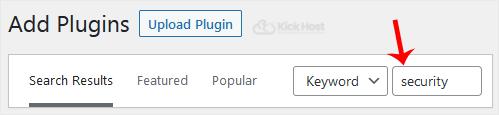
4. The available plugins matching the keyword Security will appear. Click on Install Now, next to the plugin's name.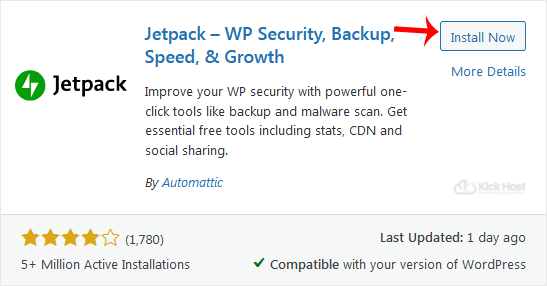
5. The installation can take a few moments. Once the Activate option appears, choose it.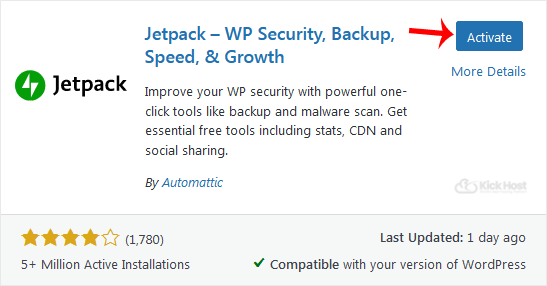
Note: After activating a plugin, a new menu of that plugin will be added to the Dashboard menu. If a plugin requires a setup, it will display an option to complete it.
- Home
-
Store
- Browse All
- Standard Hosting
- Advanced Hosting
- WordPress Hosting
- Joomla Hosting
- WooCommerce Hosting
- PrestaShop Hosting
- Magento Hosting
- School Hosting
- Core VPS
- Student Hosting
- Max Performance VPS
- Reseller Hosting
- Business Email Hosting
- Microsoft 365
- Google Workspace
- SSL Certificates
- Performance VPS
- Dedicated Servers
- DNS Management
- CloudFlare DNS
- Website Backup
- Website Security
- E-mail Services
- Register a New Domain
- Transfer Domains to Us
- Announcements
- Knowledgebase
- Network Status
- Affiliates
- Contact Us
-
More